> ## Documentation Index
> Fetch the complete documentation index at: https://docs.synscribe.com/llms.txt
> Use this file to discover all available pages before exploring further.
# Refiner vs guardrail: what's the difference?
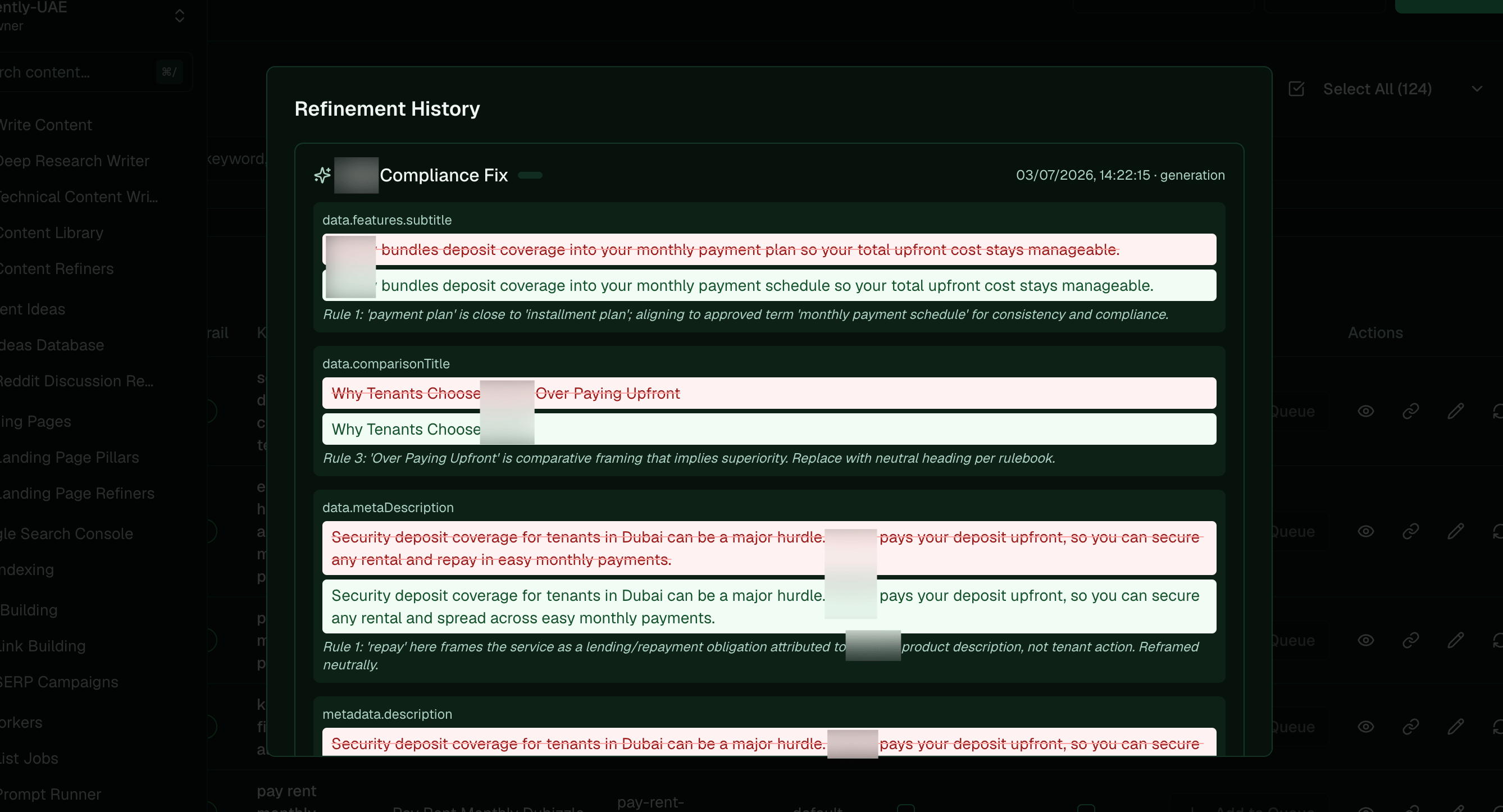
> Two systems that both touch compliance but do opposite jobs — a refiner rewrites content to fix it, the guardrail judges it pass or fail — and the refiner runs first.
A refiner and the compliance guardrail both touch compliance, which is why they get mixed up, but
they do opposite jobs and run at different times. A refiner *rewrites* your content to fix it; the
guardrail *judges* it pass or fail and blocks a publish that still breaches a rule. The order is the
key: the refiner runs first, so content gets a chance to be fixed before the guardrail ever sees it.
## The pipeline: refiners run before the guardrail
When content is generated, or when you run the refiners on a draft, the refiner rewrites it to match
your brand and compliance rules. Only later, at publish, does the guardrail judge what's left. So the
refiner is the fixer that goes first, and the guardrail is the backstop that catches anything it
missed. A well-tuned refiner means most pieces clear the guardrail on the first try, and when one
doesn't, the guardrail's suggested fix feeds a one-click refiner edit before you re-check.
 ## Fix vs gate, side by side
| | Refiner (fix) | Guardrail (gate) |
| ------------- | --------------------------------------------------------------- | -------------------------------------------------------------- |
| Job | Rewrite content to be on-brand or compliant | Decide pass/fail and block a non-compliant publish |
| Output | Edited content: a refined draft, or patched landing-page fields | A verdict plus the violations, no edits |
| You configure | The edit — a rule that rewrites text | The rules — org context plus a rule set, and a per-type toggle |
| When it runs | First: at generation, or on demand | After: at publish |
## When your policy or marketing language changes, start with the guardrail
Update the two in the right order. When your compliance requirements or approved marketing language
change, write or update the guardrail rules first, because they're your test for what "compliant"
now means. Check them against known samples, copy you know should pass and copy you know should fail,
until the guardrail gets both right (see [Calibrate the guardrail](/platform/calibrate-evaluator)).
Once the test is solid, update the refiners to edit content into shape automatically, so new drafts
pass on their own. The guardrail defines the target; the refiner automates hitting it.
**Reach for a refiner when you want to change the content; reach for the guardrail when you want to
stop bad content from shipping.**
**Related:** [Set up the compliance guardrail](/platform/set-up-evaluator) · [Calibrate the guardrail](/platform/calibrate-evaluator) · [How the guardrail decides pass/fail](/platform/how-evaluator-decides) · [Automate compliance checks](/platform/automate-compliance-checks) · [Set up blog refiners](/platform/set-up-refiners) · [LP refiners](/platform/landing-page-refiners)
## Fix vs gate, side by side
| | Refiner (fix) | Guardrail (gate) |
| ------------- | --------------------------------------------------------------- | -------------------------------------------------------------- |
| Job | Rewrite content to be on-brand or compliant | Decide pass/fail and block a non-compliant publish |
| Output | Edited content: a refined draft, or patched landing-page fields | A verdict plus the violations, no edits |
| You configure | The edit — a rule that rewrites text | The rules — org context plus a rule set, and a per-type toggle |
| When it runs | First: at generation, or on demand | After: at publish |
## When your policy or marketing language changes, start with the guardrail
Update the two in the right order. When your compliance requirements or approved marketing language
change, write or update the guardrail rules first, because they're your test for what "compliant"
now means. Check them against known samples, copy you know should pass and copy you know should fail,
until the guardrail gets both right (see [Calibrate the guardrail](/platform/calibrate-evaluator)).
Once the test is solid, update the refiners to edit content into shape automatically, so new drafts
pass on their own. The guardrail defines the target; the refiner automates hitting it.
**Reach for a refiner when you want to change the content; reach for the guardrail when you want to
stop bad content from shipping.**
**Related:** [Set up the compliance guardrail](/platform/set-up-evaluator) · [Calibrate the guardrail](/platform/calibrate-evaluator) · [How the guardrail decides pass/fail](/platform/how-evaluator-decides) · [Automate compliance checks](/platform/automate-compliance-checks) · [Set up blog refiners](/platform/set-up-refiners) · [LP refiners](/platform/landing-page-refiners)