> ## Documentation Index
> Fetch the complete documentation index at: https://docs.synscribe.com/llms.txt
> Use this file to discover all available pages before exploring further.
# How to structure landing page headings so crawlers read your keywords
> Promote the eyebrow to H1 and let the heading outline carry your keywords, without changing how the page looks to a visitor.
A crawler doesn't see your hero the way a visitor does. It reads the page as an outline of headings, so the line you style biggest is not necessarily the line that counts. Put the keyword-carrying line in the H1 and leave the big display headline as an ordinary paragraph. On most landing pages the eyebrow (the small kicker sitting above the headline) is already the right text for it: short, categorical, and close to what someone would type into search. Then make the H2s and H3s below it tell the same story. None of this changes a single pixel, and a human still reads the big headline first.
## What the crawler actually sees
Here are two versions of the same hero. Visually they're identical. Their heading outlines are not.
The unoptimized one uses the marketing headline as the H1, and phrases every section the way a copywriter would say it out loud:
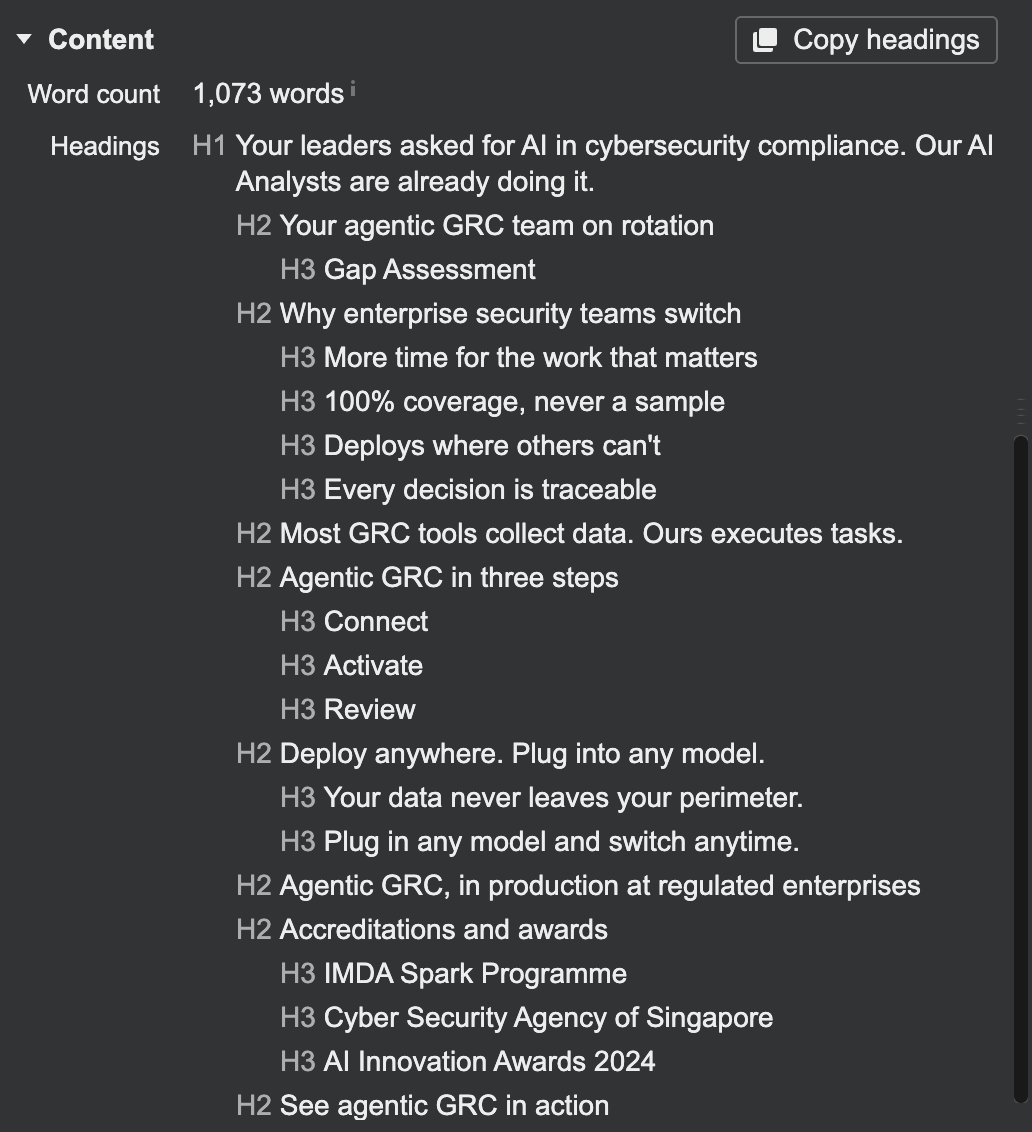 Nothing in that outline says what the product is. "Your leaders asked for AI in cybersecurity compliance" is a good headline and a bad H1. The optimized version moves the category line into the H1 and rewrites the sections around it:
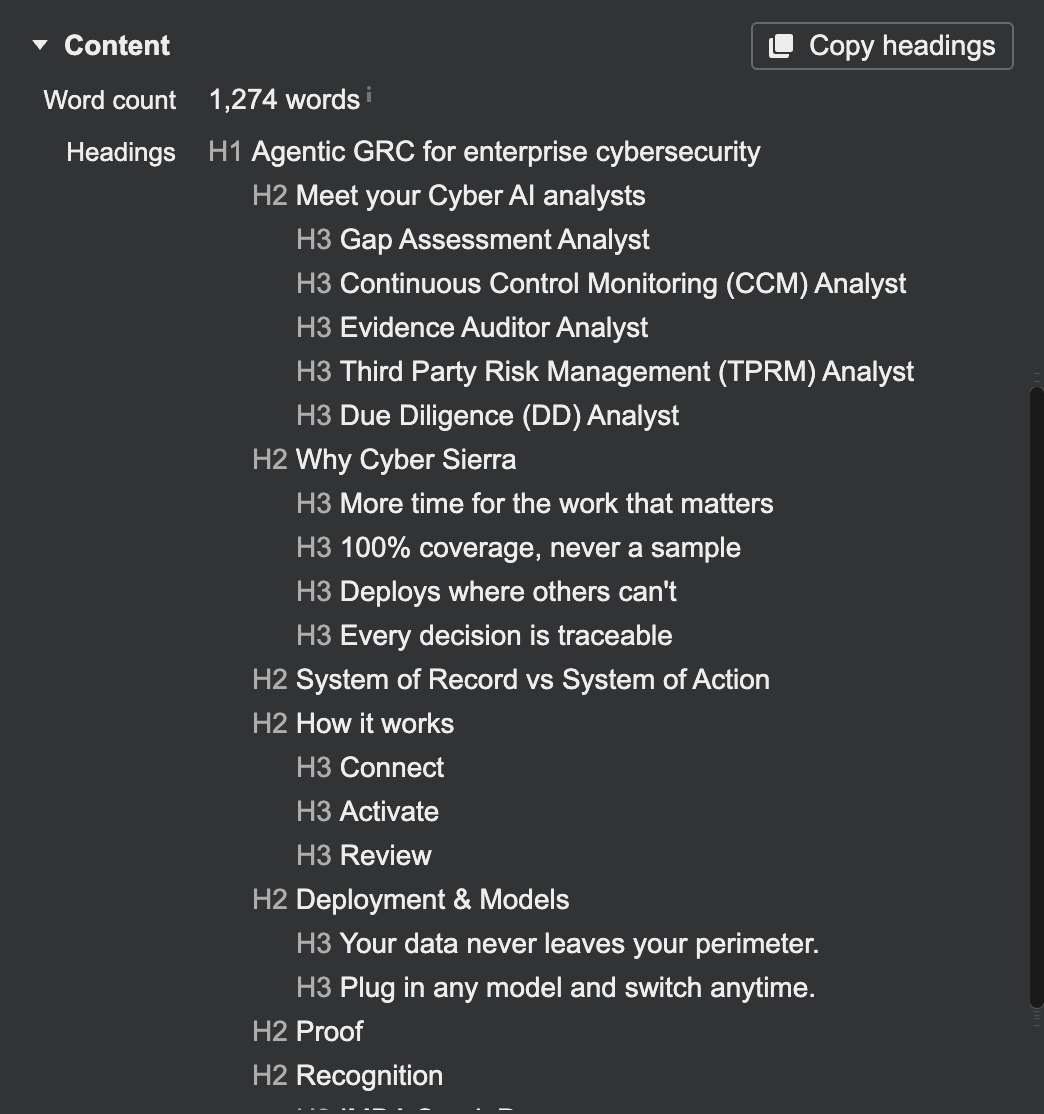 Read the second outline top to bottom and you get the whole pitch: what it is, the analysts you get, why you'd switch, and the comparison the buyer is searching for. The "System of Record vs System of Action" H2 targets that query directly.
## 1. Look at the outline you have today
Open the page with the Ahrefs SEO toolbar and go to the Content panel. It prints the heading tree and gives you a **Copy headings** button, which is the fastest way to read your own page the way a crawler does. Inspect element works too, it's just slower.
Ask yourself one question: if you deleted everything except these headings, would a stranger know what you sell? On most landing pages the answer is no.
## 2. Promote the eyebrow to H1
The eyebrow above the headline is usually a few words naming the category, which is exactly the shape of a good H1. Mark it up as the `H1` and demote the display headline to a paragraph.
Read the second outline top to bottom and you get the whole pitch: what it is, the analysts you get, why you'd switch, and the comparison the buyer is searching for. The "System of Record vs System of Action" H2 targets that query directly.
## 1. Look at the outline you have today
Open the page with the Ahrefs SEO toolbar and go to the Content panel. It prints the heading tree and gives you a **Copy headings** button, which is the fastest way to read your own page the way a crawler does. Inspect element works too, it's just slower.
Ask yourself one question: if you deleted everything except these headings, would a stranger know what you sell? On most landing pages the answer is no.
## 2. Promote the eyebrow to H1
The eyebrow above the headline is usually a few words naming the category, which is exactly the shape of a good H1. Mark it up as the `H1` and demote the display headline to a paragraph.
 The visitor's experience is untouched. They see the eyebrow as a kicker and the big line as the title, because that's what the type sizes tell them. The crawler sees a keyword-first H1.
Two things to hold to: keep one H1 per page, and keep the eyebrow honest. This works because the eyebrow genuinely describes the page, not because you smuggled keywords into it.
## 3. Rewrite the sections so the outline reads as a story
The H1 alone isn't the win. The sections underneath have to carry the same story, phrased the way a buyer would search for it. "Why enterprise security teams switch" becomes "Why \[your company]". A section that exists to win a comparison query gets named after the comparison.
If you want a starting point, hand Pi the page and ask:
```text theme={null}
here's [page URL]. read the heading outline and rewrite it so the H1 names
[category] and the H2s cover what someone searching for [category] would actually
type. keep the visible copy intact where you can, and tell me which headings you
changed and why.
```
Pi comes back with a proposed outline and its reasoning. You decide what ships.
Keep the H3s underneath doing real work. In the example above, each AI analyst gets its own H3, so the sub-headings name the specific capabilities buyers search for instead of repeating the H2.
## 4. Check it landed in the DOM
Right-click the eyebrow, inspect element, and confirm it's an `h1` and that the display headline is a `p`. A styled `div` that merely looks like a heading counts for nothing. Then re-run the Content panel and read the outline once more, top to bottom.
Roll this into the [technical SEO audit](/platform/technical-seo-audit) you run before a page counts as done. The audit's heading check is this check.
**Related:** [How to run a technical SEO audit](/platform/technical-seo-audit) · [Design a landing page pillar](/platform/design-landing-page-pillar) · [Definition of Done](/theory/definition-of-done)
The visitor's experience is untouched. They see the eyebrow as a kicker and the big line as the title, because that's what the type sizes tell them. The crawler sees a keyword-first H1.
Two things to hold to: keep one H1 per page, and keep the eyebrow honest. This works because the eyebrow genuinely describes the page, not because you smuggled keywords into it.
## 3. Rewrite the sections so the outline reads as a story
The H1 alone isn't the win. The sections underneath have to carry the same story, phrased the way a buyer would search for it. "Why enterprise security teams switch" becomes "Why \[your company]". A section that exists to win a comparison query gets named after the comparison.
If you want a starting point, hand Pi the page and ask:
```text theme={null}
here's [page URL]. read the heading outline and rewrite it so the H1 names
[category] and the H2s cover what someone searching for [category] would actually
type. keep the visible copy intact where you can, and tell me which headings you
changed and why.
```
Pi comes back with a proposed outline and its reasoning. You decide what ships.
Keep the H3s underneath doing real work. In the example above, each AI analyst gets its own H3, so the sub-headings name the specific capabilities buyers search for instead of repeating the H2.
## 4. Check it landed in the DOM
Right-click the eyebrow, inspect element, and confirm it's an `h1` and that the display headline is a `p`. A styled `div` that merely looks like a heading counts for nothing. Then re-run the Content panel and read the outline once more, top to bottom.
Roll this into the [technical SEO audit](/platform/technical-seo-audit) you run before a page counts as done. The audit's heading check is this check.
**Related:** [How to run a technical SEO audit](/platform/technical-seo-audit) · [Design a landing page pillar](/platform/design-landing-page-pillar) · [Definition of Done](/theory/definition-of-done)