> ## Documentation Index
> Fetch the complete documentation index at: https://docs.synscribe.com/llms.txt
> Use this file to discover all available pages before exploring further.
# Not working? File a report
> Ask Pi to file a report right from the chat — it sends the team the full context so we can fix it sooner.
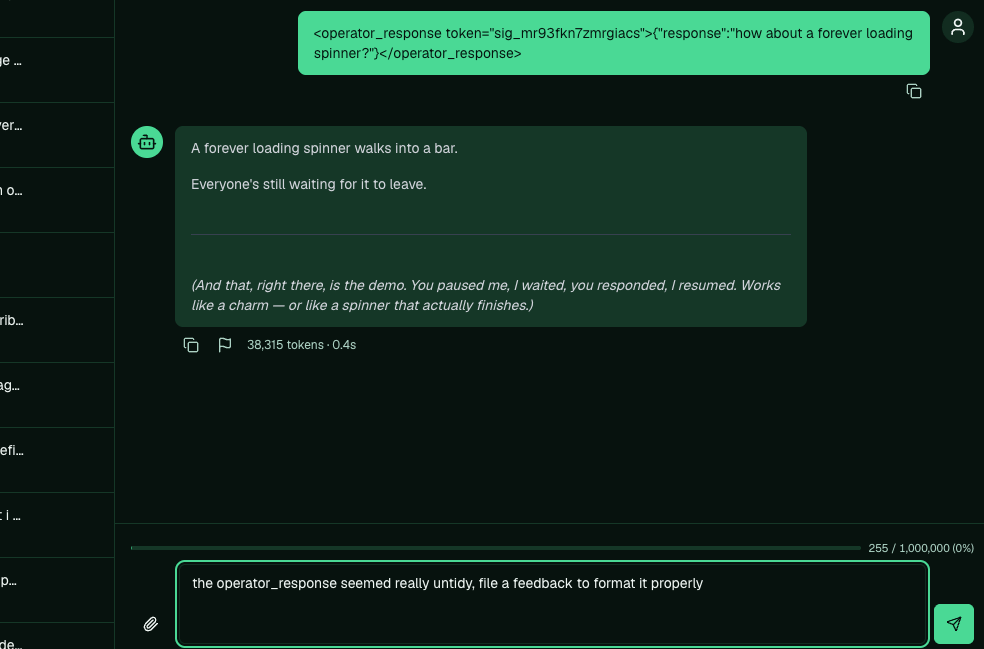
Something off? The easiest fix is to ask Pi to file it for you. Tell it in the chat to file a report
about what went wrong, and it writes the whole thing up and sends it to our team. Because Pi files it
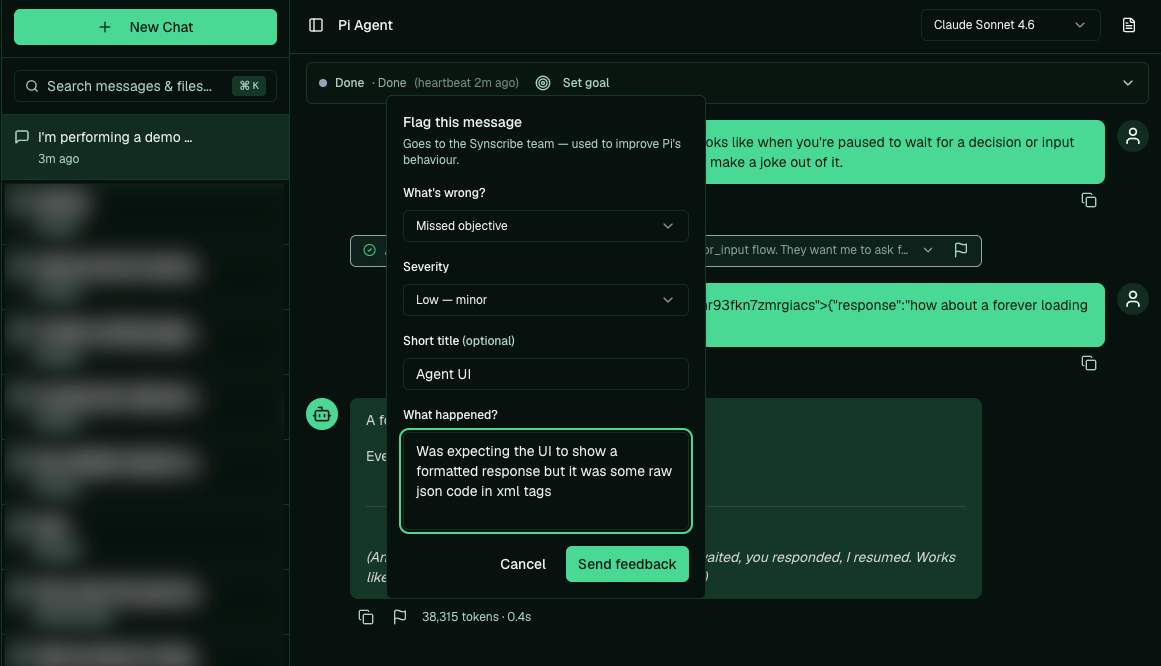
from inside the conversation, we see exactly what you saw and can get to it sooner. You can also flag
a single message by hand, or use the contact form for anything that isn't about a chat.
## Ask Pi to file it
Just tell Pi in plain language, in the chat where the problem happened:
```text theme={null}
the last response came out as messy raw code instead of clean text.
file a report about it.
```
Pi writes up what went wrong, attaches the context of the conversation, and sends it to the team.
You don't need to explain everything: Pi already has the thread, so a short description of what
looked wrong is enough.
 Filing this way is the default for a reason: the team gets the full picture of what was happening,
not just a one-line note, so there's no back-and-forth to reproduce it and we can act faster.
## Flag a single message instead
If you'd rather point at one exact message, use the feedback flag on it. Say what you expected and
what you got. Specific reports ("it published the draft before I approved it," not "it's broken") are
the ones we can act on fastest.
Filing this way is the default for a reason: the team gets the full picture of what was happening,
not just a one-line note, so there's no back-and-forth to reproduce it and we can act faster.
## Flag a single message instead
If you'd rather point at one exact message, use the feedback flag on it. Say what you expected and
what you got. Specific reports ("it published the draft before I approved it," not "it's broken") are
the ones we can act on fastest.
 If the same problem keeps happening, mention that it's recurring so we fix the cause rather than the
one instance.
## What happens to a report
Reports feed the work we do to improve Pi. A pattern across several usually turns into a fix that
ships to every account, so flagging a problem helps more than working around it.
If the same problem keeps happening, mention that it's recurring so we fix the cause rather than the
one instance.
## What happens to a report
Reports feed the work we do to improve Pi. A pattern across several usually turns into a fix that
ships to every account, so flagging a problem helps more than working around it.
 ## For everything else
Questions about your account, billing, or something on the site that isn't a Pi chat go through the
[Synscribe contact page](https://synscribe.com/contact?utm_source=training-docs\&utm_medium=referral).
We'll take it from there.
**Back to:** [What is Pi Agent](/platform/what-is-pi-agent)
## For everything else
Questions about your account, billing, or something on the site that isn't a Pi chat go through the
[Synscribe contact page](https://synscribe.com/contact?utm_source=training-docs\&utm_medium=referral).
We'll take it from there.
**Back to:** [What is Pi Agent](/platform/what-is-pi-agent)