> ## Documentation Index
> Fetch the complete documentation index at: https://docs.synscribe.com/llms.txt
> Use this file to discover all available pages before exploring further.
# How to calibrate the compliance guardrail (test it before you trust it)
> Run the compliance judge on copy you know should fail and copy you know should pass, then tighten the rules until it gets both right.
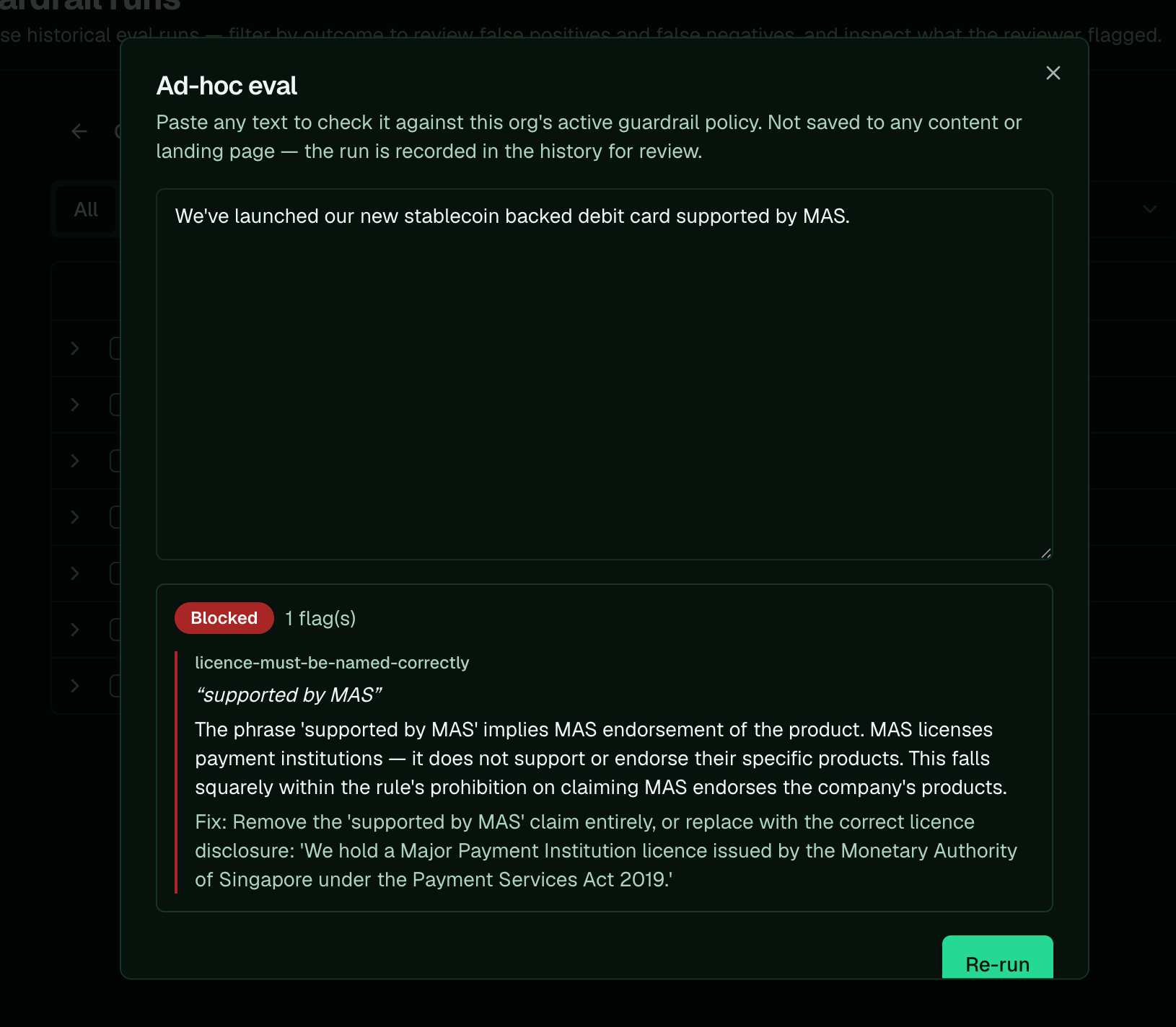
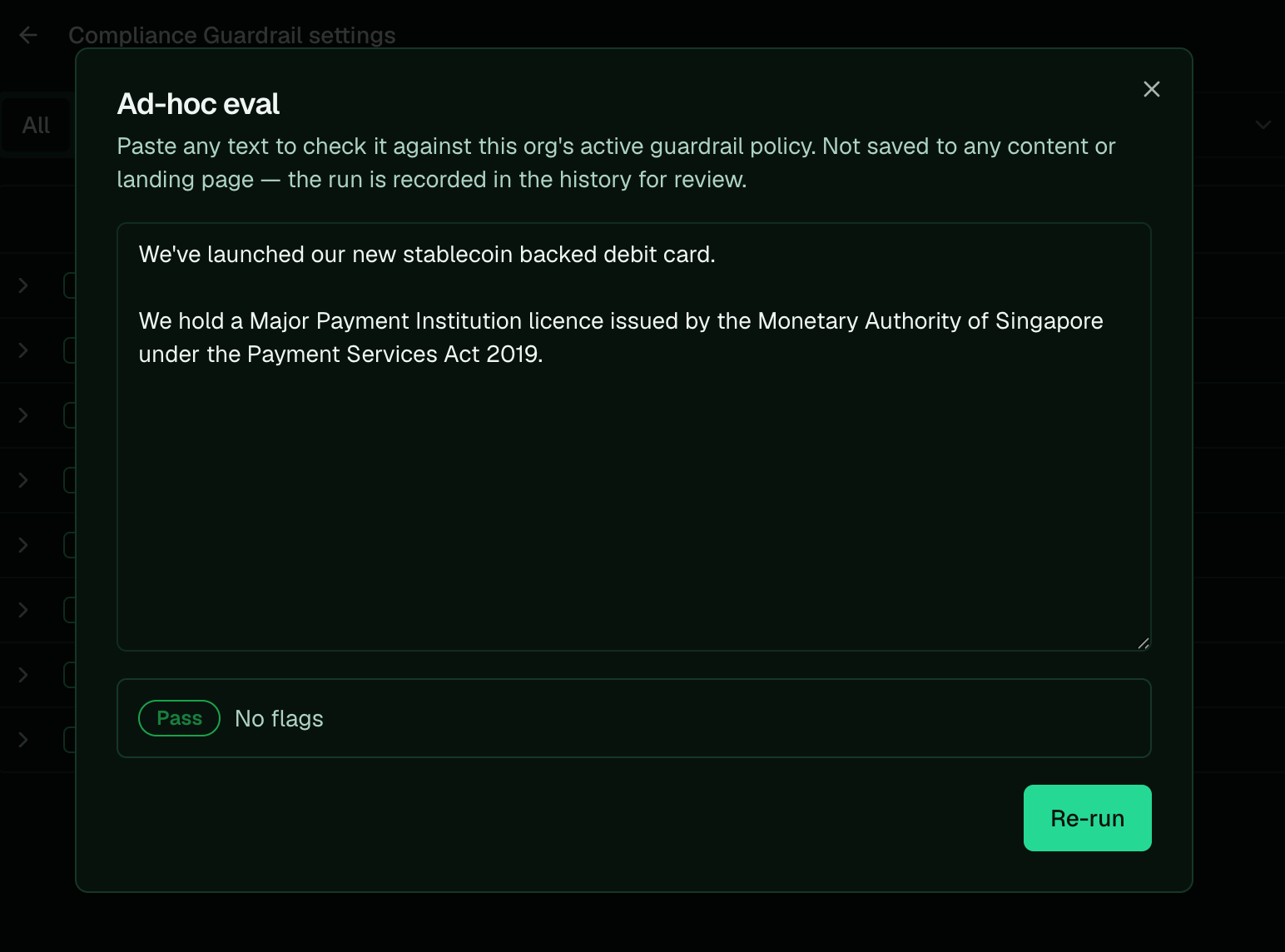
Calibrate the guardrail in the app before you rely on it. Use **Run ad-hoc eval** on the guardrail
runs page to check copy you already know the answer to, a piece that *should* fail and one that
*should* pass, and confirm it gets both right. It checks any copy against your active policy without
touching a draft, so you can tune the rules before you ever gate a real publish. When a check gets it
wrong, adjust the rule (or ask Pi to) and re-run.
## Steps
1. Open the [Compliance Guardrail Page](https://www.synscribe.com/app/guardrail).
2. Go to [View guardrail runs](https://www.synscribe.com/app/guardrail/runs).
3. Click **Run ad-hoc eval**.
4. Test with known samples. Paste a piece you *know* breaches a rule; it should come back **Blocked** with a flag on the right rule. Then paste one you *know* is clean; it should **Pass** with no flags. You can check a single line or a whole blog post.
5. Adjust the rule if it gets one wrong. If it over-flags (blocks the clean piece), tighten the carve-out. If it under-flags (passes the bad piece), sharpen the "flag" half or add a bad example. Then re-run.
6. Repeat with more samples for breadth. Cover the edge cases and phrasings you actually publish, not just one pair.
7. Test on real content your Synscribe writer produced. Paste a whole draft into the ad-hoc eval, or ask Pi to check a specific piece for you.
Trust the behavior, not the wording: a rule that reads airtight but flags clean copy is worse than a
plain one that gets both samples right.
 ## Review past runs to spot false positives and negatives
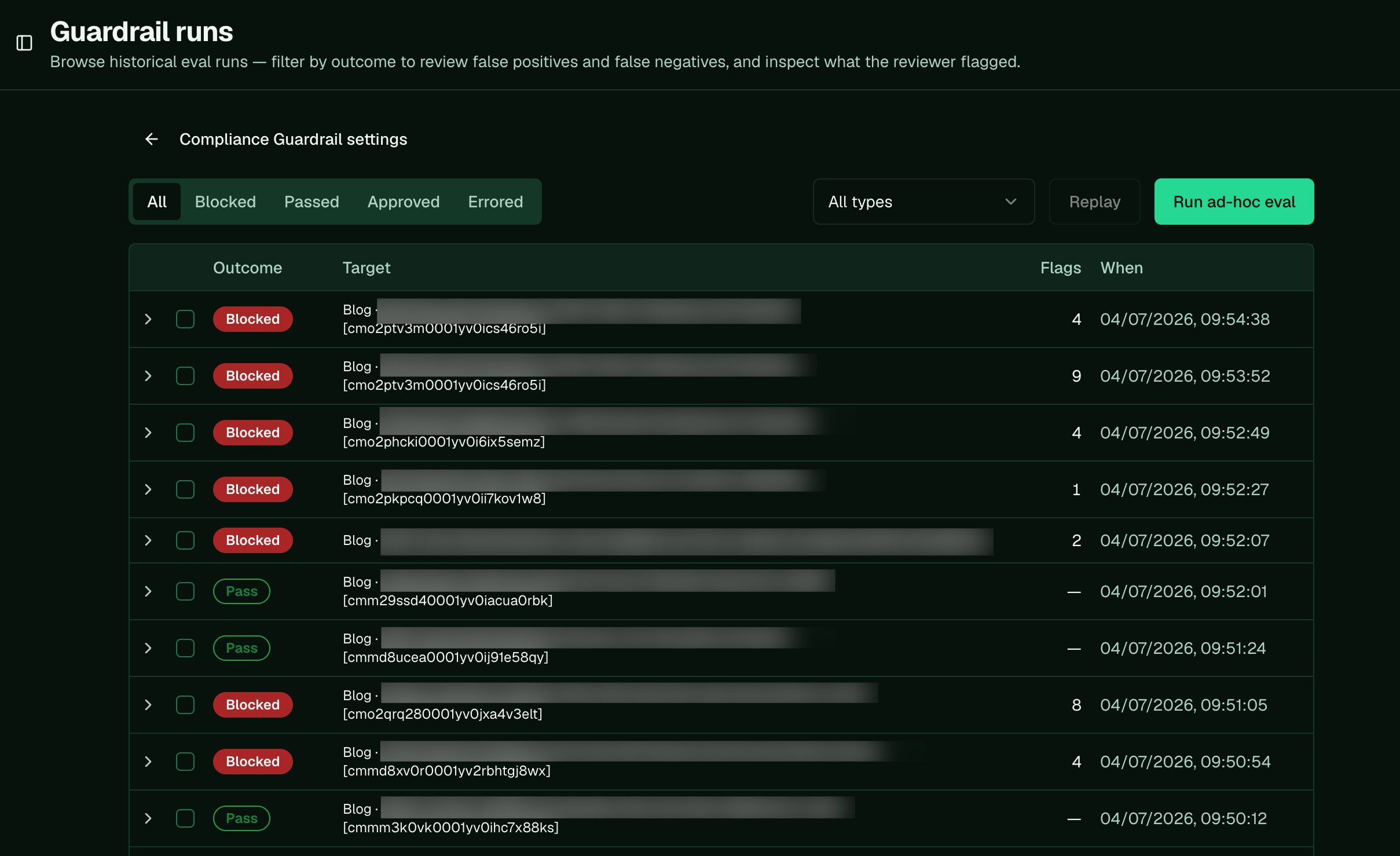
Every check is saved. On the runs page, filter by outcome to find the two things worth fixing: a pass
that should have failed, or a block that should have passed. Expand any run to see exactly what the
judge flagged and the fix it suggested.
## Review past runs to spot false positives and negatives
Every check is saved. On the runs page, filter by outcome to find the two things worth fixing: a pass
that should have failed, or a block that should have passed. Expand any run to see exactly what the
judge flagged and the fix it suggested.
 ## Ask Pi to fix a wrongly-flagged rule
When you find content that was flagged wrong, hand Pi the exact example and tell it which way to move
the rule, loosening or tightening it and adding the example so the fix sticks.
A **false positive** is the guardrail flagging copy that's actually fine. Tell Pi to loosen the rule
and add the wrongly-flagged line as a passing example:
```text theme={null}
the guardrail flagged "[the exact line]" under [rule], but that's fine because [reason].
loosen that rule so it stops catching this, and add "[the exact line]" as a passing example.
```
A **false negative** is the guardrail missing copy that should have been caught. Tell Pi to make the
rule stricter and add the missed line as a failing example:
```text theme={null}
the guardrail passed "[the exact line]", but it should be flagged under [rule] because [reason].
make that rule stricter to catch it, and add "[the exact line]" as a failing example.
```
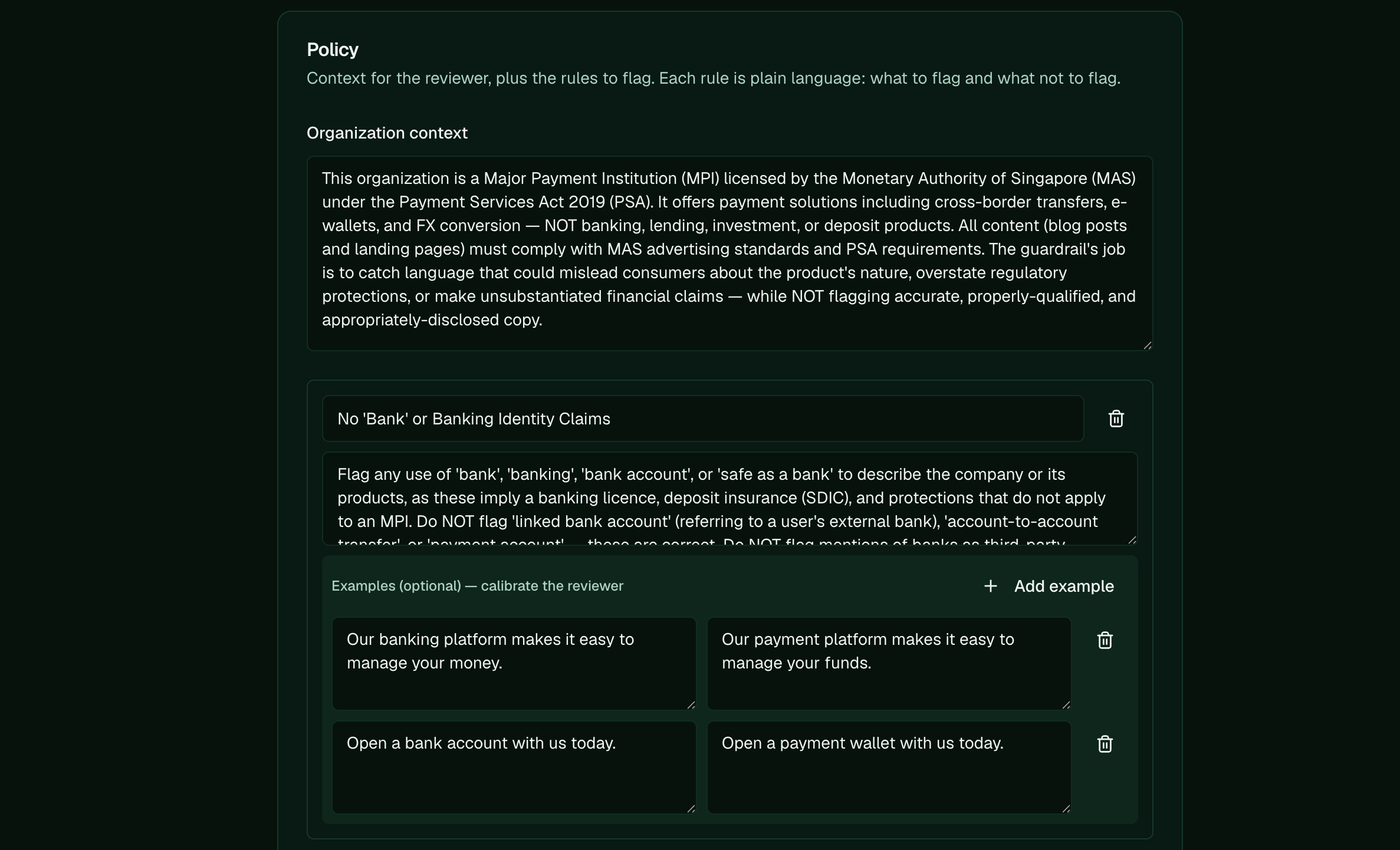
Those examples are the strongest lever you have. The judge reads a rule's good and bad examples on
every run, so one sharp pair draws the line far better than more words in the guidance. Ask Pi to add
them, or add them yourself on the rule under **Examples (optional) — calibrate the reviewer**.
## Ask Pi to fix a wrongly-flagged rule
When you find content that was flagged wrong, hand Pi the exact example and tell it which way to move
the rule, loosening or tightening it and adding the example so the fix sticks.
A **false positive** is the guardrail flagging copy that's actually fine. Tell Pi to loosen the rule
and add the wrongly-flagged line as a passing example:
```text theme={null}
the guardrail flagged "[the exact line]" under [rule], but that's fine because [reason].
loosen that rule so it stops catching this, and add "[the exact line]" as a passing example.
```
A **false negative** is the guardrail missing copy that should have been caught. Tell Pi to make the
rule stricter and add the missed line as a failing example:
```text theme={null}
the guardrail passed "[the exact line]", but it should be flagged under [rule] because [reason].
make that rule stricter to catch it, and add "[the exact line]" as a failing example.
```
Those examples are the strongest lever you have. The judge reads a rule's good and bad examples on
every run, so one sharp pair draws the line far better than more words in the guidance. Ask Pi to add
them, or add them yourself on the rule under **Examples (optional) — calibrate the reviewer**.
 **Next:** [Automate compliance checks](/platform/automate-compliance-checks) · **Related:** [Set up the compliance guardrail](/platform/set-up-evaluator) · [How the guardrail decides pass/fail](/platform/how-evaluator-decides) · [Refiner vs guardrail](/platform/refiner-vs-evaluator)