> ## Documentation Index
> Fetch the complete documentation index at: https://docs.synscribe.com/llms.txt
> Use this file to discover all available pages before exploring further.
# How to turn a sales call or shower thought into a blog post
> Turn a customer question, a call, or a stray idea into a drafted post: tell Pi, bring your own angle, or paste a sales transcript.
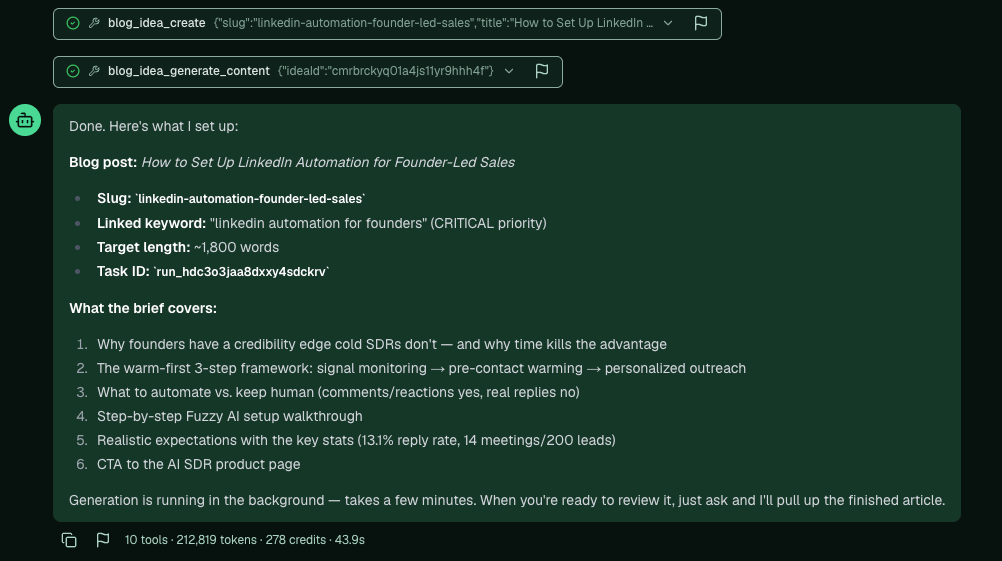
When a topic just occurs to you, a question a customer keeps asking, an insight from a call, a stray idea worth a post, you don't need keyword research or a report. Tell Pi to write a blog post on it and it researches the topic, links it to a matching keyword if you have one, shows you its brief, and drafts it in the background. You can also hand Pi your own take, or paste a whole sales transcript and ask for topics that would land with that prospect. The draft shows up in your Content Library a few minutes later.
## When to use this
Reach for this when the idea comes from you or a conversation rather than from a keyword or a Reddit thread. A question that keeps coming up with customers, a point you found yourself making on a call, a thought you don't want to lose. It's the fastest path from idea to draft.
## Just tell Pi
Open a Pi chat and say what you want:
```text theme={null}
help me write a blog post on [your topic]
```
Pi checks your keywords for a match and links the post to one if it fits, then creates the idea with a brief.
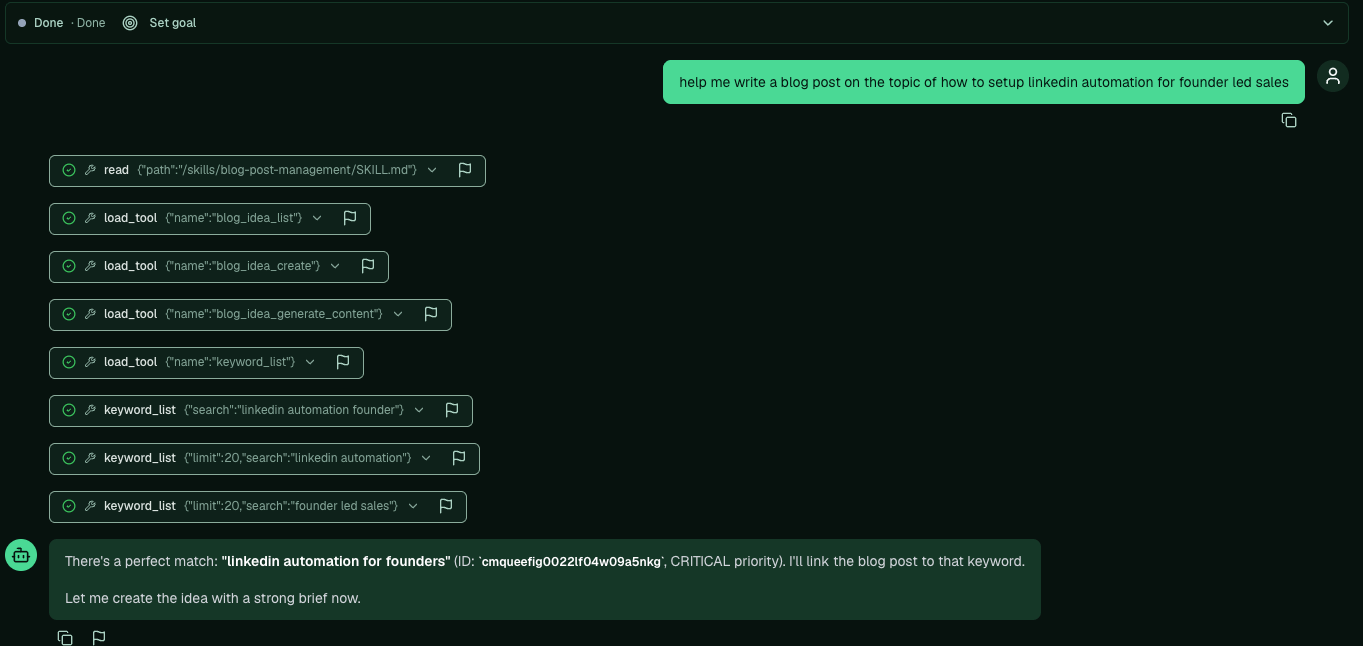 It shows you how it plans to write the piece, the brief it will follow, and starts generating in the background. Ask for it when you're ready and Pi pulls up the finished article, or find it in your Content Library.
 ## Bring your own angle
You don't have to hand Pi a clean topic. Talk through your own take, the angle you'd want, the point you're trying to make, and it bakes that into the piece instead of writing the generic version. The more of your own thinking you give it, the more the post sounds like you and not like everyone else's take on the subject.
## Turn a sales call into topics
A trick worth stealing: paste a sales transcript into Pi and ask for the blog topics that would land with that prospect.
```text theme={null}
here's a sales call transcript. pull out a few blog post topics that would be interesting to this prospect.
```
Once Pi gives you the topics, tell it to write them:
```text theme={null}
queue all of those into the blog writer and write them.
```
Each one drafts in the background and lands in your Content Library, ready to [edit](/platform/edit-articles) and [refine](/platform/set-up-refiners).
**Back to:** [Creating blogs](/platform/creating-blogs) · **Next:** [Edit an AI-generated article](/platform/edit-articles)
## Bring your own angle
You don't have to hand Pi a clean topic. Talk through your own take, the angle you'd want, the point you're trying to make, and it bakes that into the piece instead of writing the generic version. The more of your own thinking you give it, the more the post sounds like you and not like everyone else's take on the subject.
## Turn a sales call into topics
A trick worth stealing: paste a sales transcript into Pi and ask for the blog topics that would land with that prospect.
```text theme={null}
here's a sales call transcript. pull out a few blog post topics that would be interesting to this prospect.
```
Once Pi gives you the topics, tell it to write them:
```text theme={null}
queue all of those into the blog writer and write them.
```
Each one drafts in the background and lands in your Content Library, ready to [edit](/platform/edit-articles) and [refine](/platform/set-up-refiners).
**Back to:** [Creating blogs](/platform/creating-blogs) · **Next:** [Edit an AI-generated article](/platform/edit-articles)